Introducing DrapCode’s MCP Server: The HIPAA-Compliant Backend for AI Builders
Building a healthcare app has become surprisingly fast. Open Lovable, Claude Code, Cursor, Replit, Base44, or another AI development tool, describe what you want, and you can have a working interface much sooner than traditional development would allow.
A patient intake flow that once took days can take hours. A provider dashboard can come together over a weekend. A healthcare founder can finally put an idea in front of clinicians without hiring a full engineering team first.
That's the good part. The harder part usually appears when the prototype starts moving toward real healthcare use.
That's when questions like these start coming up:
- Where will patient data live?
- Who can access it?
- Are important actions logged?
- Can we sign a BAA?
- How will the application connect to an EHR?
- Where will uploaded medical documents be stored?
- What happens when five test users become an entire healthcare organization?
At that point, the challenge isn't building another screen. It's building everything the healthcare application needs behind those screens.
That's why we're introducing the DrapCode MCP Server, which lets you keep building in the AI development tool you already like while connecting your application to DrapCode's healthcare backend.
AI Made Building Faster
Many AI-built healthcare apps start the same way. A founder might have an idea for a patient portal, care-management dashboard, RPM application, or a better way for providers to follow up with patients.
They open an AI coding tool, start prompting, and within a few hours they may already have:
- Login and registration screens
- Patient and provider dashboards
- Intake forms
- Appointment workflows
- Patient profiles
- Early API integrations
It can feel like most of the application is already finished. But those screens are only the visible part of a healthcare product.
Once the application needs to handle real PHI, you also need to think about the backend. That includes where patient information is stored, how users are authenticated, who can access each record, what activity is logged, and how the application communicates with other healthcare systems.
DrapCode MCP helps bridge that gap.
What Is DrapCode MCP?
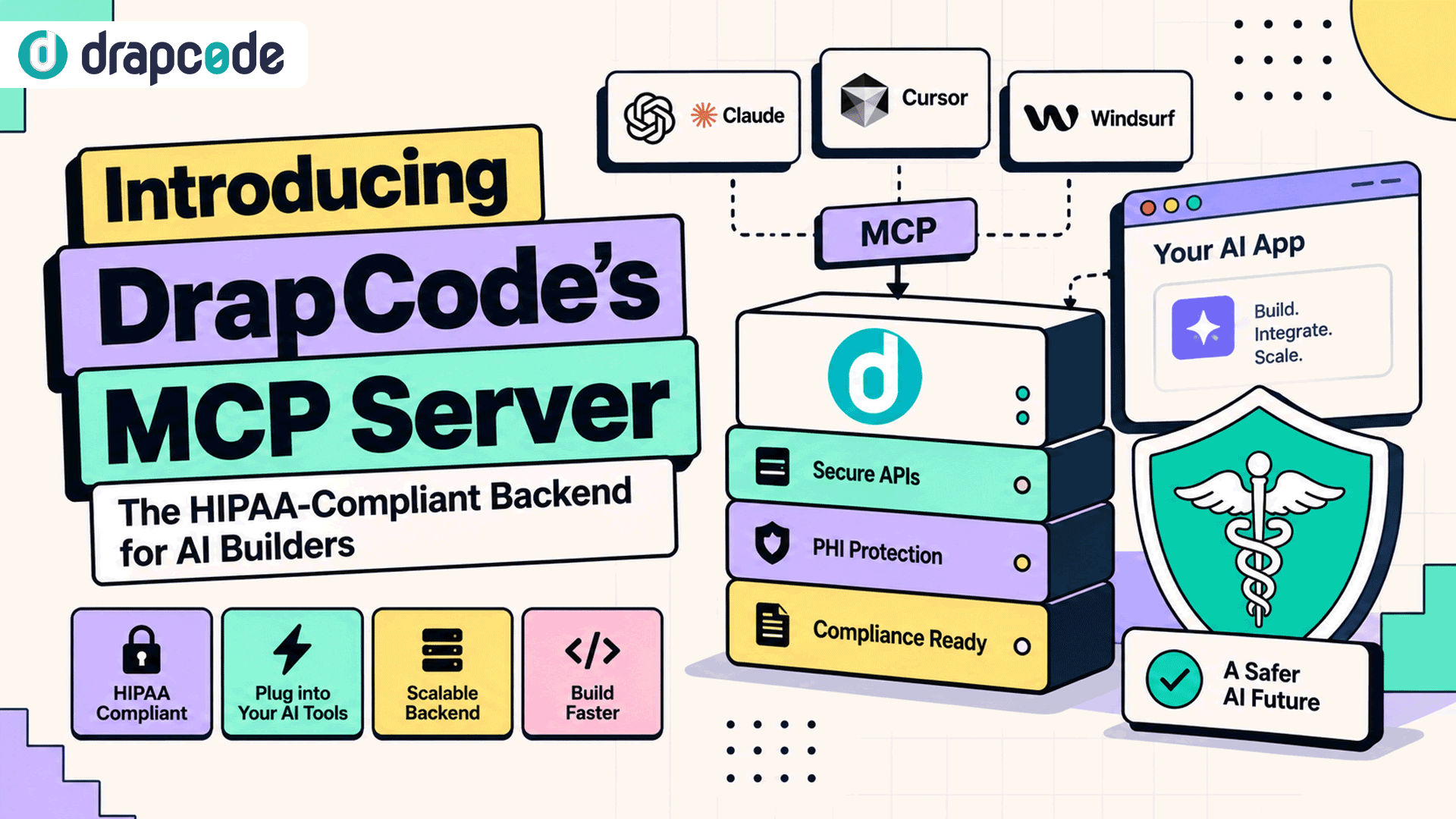
MCP stands for Model Context Protocol. It provides a standard way for compatible AI development environments to communicate with external systems instead of requiring every connection to be built independently.
With the DrapCode MCP Server, an MCP-compatible AI development tool can connect directly with DrapCode's healthcare backend capabilities.
The basic architecture looks like this:
- Build in your AI tool - Continue creating the frontend and application experience using your preferred development environment.
- Connect through MCP - Your AI development environment communicates with DrapCode through the MCP Server.
- Use DrapCode's backend - Connect the application to backend capabilities needed for healthcare workflows and production use.
This means teams don't necessarily have to choose between the development speed they get from AI tools and a healthcare-focused backend.
Behind Your AI App
Connecting two tools isn't particularly useful on its own. What matters is what becomes available to your application after that connection is established.
DrapCode provides the backend foundation needed to move an AI-built healthcare application beyond the prototype stage.
Secure Database
Your prototype eventually needs a real data layer. DrapCode provides a structured backend to store and manage application data for production workloads.
For a healthcare application, that can include:
- Patient profiles
- Provider information
- Appointments
- Care plans
- Operational records
- Application data
- Uploaded information and documents
Instead of leaving the production data architecture until later, teams can start connecting their frontend to the backend it will actually use.
User Permissions
Healthcare applications rarely have only one type of user. Patients, physicians, nurses, billing teams, administrators, and other users can require very different levels of access.
DrapCode supports defined user roles so applications can control what different users can access.
For example:
- Patients can access their own permitted information.
- Providers can access records relevant to their responsibilities.
- Billing teams can work with appropriate financial and administrative information.
- Administrators can manage the application without automatically exposing every workflow to every user.
This becomes especially important as a small prototype becomes a multi-user healthcare platform.
Audit Logs
When sensitive healthcare information is involved, knowing that something changed may not be enough. Teams may also need visibility into important activity involving users, records, and application workflows.
Auditability helps answer practical questions such as:
- Who accessed a record?
- What action occurred?
- When did it happen?
- Which user performed the action?
- What important application activity needs review?
Building this visibility into the backend is considerably easier than trying to recreate it after the application has already entered production.
Healthcare Integrations
A healthcare application rarely operates completely on its own. It may eventually need to communicate with EHRs, FHIR servers, laboratories, payment systems, messaging services, identity providers, or other external platforms.
DrapCode can support connections with:
- EHR and EMR systems
- FHIR APIs
- Healthcare APIs
- External databases
- Payment providers
- Messaging services
- Third-party business systems
That gives teams a path from an isolated AI prototype toward an application that can participate in real healthcare workflows.
Application Workflows
The frontend shows users what is happening, while the backend determines what should happen after an action occurs.
For example:
- A patient completes an intake form.
- The application stores the information.
- The appropriate care team is notified.
- A provider reviews the submission.
- The patient's workflow moves to the next stage.
Other applications might use backend workflows for approvals, notifications, data processing, referrals, follow-ups, or administrative tasks.
DrapCode provides the backend logic needed to connect these actions instead of leaving every workflow inside frontend code.
Where HIPAA Fits
This is where building a healthcare application becomes different from building another SaaS product.
If you're experimenting with synthetic patient records, the production backend may not feel urgent. Once real PHI enters the application, decisions about infrastructure, access, auditability, vendors, and data handling matter much more.
DrapCode provides healthcare-focused infrastructure designed to support HIPAA security and data-protection requirements, including capabilities such as:
- Role-based access
- Audit logging
- Encryption
- Healthcare-focused infrastructure
- BAA support for applicable projects
- SOC 2 Type II controls
- ISO 27001 controls
There is an important distinction here: connecting an application to DrapCode does not automatically make every possible application HIPAA-compliant.
The application's overall compliance posture also depends on its configuration, PHI workflows, third-party integrations, organizational practices, and how the application is ultimately operated.
What DrapCode provides is a healthcare-focused backend foundation so teams aren't trying to retrofit fundamental controls after real patient information has already entered the application.
Keep Your AI Builder
DrapCode MCP isn't about asking developers to abandon the tools that helped them build their application.
If your team already has a productive development workflow, the goal is to preserve it while strengthening what sits behind the application.
That could mean:
- Lovable for rapidly creating and refining the application experience.
- Claude Code for working directly with a development codebase.
- Cursor for AI-assisted coding inside an editor.
- Base44 for quickly developing application concepts.
- Other MCP-compatible tools as their MCP capabilities allow.
Compatibility depends on the development tool's MCP support and DrapCode's connection and authentication requirements.
The important point is that two decisions can remain separate:
- Where does my team want to build the application?
- What backend should run behind the healthcare application?
You shouldn't necessarily have to abandon the first choice to solve the second problem.
From Prototype to Clinic
Imagine you've used an AI development tool to create a patient portal.
The prototype already includes:
- Patient registration
- Patient dashboard
- Appointment requests
- Provider profiles
- Medical document uploads
- Secure messaging screens
For an investor demo or an internal product review, that may be enough to prove the idea.
Then a clinic agrees to pilot it.
The requirements immediately become more serious:
- Patient records need an appropriate production data layer.
- Patients, providers, and administrators need different permissions.
- Important activity needs to be auditable.
- The portal may need to exchange information with existing healthcare systems.
- The team needs to evaluate HIPAA responsibilities before real PHI enters the application.
- Applicable business associate relationships and BAAs need to be addressed.
This is where DrapCode MCP can become useful.
Instead of treating the AI prototype as disposable, the existing frontend can become the starting point while DrapCode provides the backend foundation needed to take the product further.
Connect in Three Steps
The connection process keeps the development workflow straightforward.
- Set up DrapCode - Create a DrapCode project or use an existing one to provide the backend for the healthcare application.
- Connect the MCP Server - Add DrapCode's MCP Server to your compatible AI development environment and authenticate the DrapCode project.
- Continue building - Keep developing from your preferred AI environment while working with the DrapCode capabilities available through MCP.
The important part isn't simply reducing configuration steps. It's that the application can start using the backend it will need rather than relying indefinitely on a temporary prototype architecture.
What Can You Build?
DrapCode MCP isn't limited to patient intake forms or small internal healthcare tools. The same approach can support different types of healthcare applications depending on their requirements.
Patient Portals
Build patient-facing applications for accessing information, managing appointments, submitting forms, uploading documents, and interacting with healthcare services.
EHR Applications
Create applications that need to exchange information with existing EHR or EMR systems through healthcare integrations and APIs.
Telehealth Platforms
Connect patient, provider, scheduling, administrative, and communication workflows within a healthcare-focused application architecture.
Care Management
Build systems for coordinating patients, care teams, tasks, follow-ups, plans, and ongoing care activities.
Remote Monitoring
Develop applications that collect and manage ongoing patient information while supporting provider and operational workflows.
Clinical Workflows
Connect healthcare data, users, approvals, notifications, integrations, and operational processes without forcing everything into frontend code.
The frontend can still be developed in the environment that makes your team productive. DrapCode provides the healthcare-focused backend foundation behind it.
Avoid Backend Lock-In
Healthcare products change significantly as they grow. The architecture that works when you're onboarding the first clinic may not be the architecture you want after signing larger healthcare organizations.
Backend convenience shouldn't mean giving up control over the application.
DrapCode supports source-code export and database export, giving teams greater control over their application and data if their infrastructure requirements change later.
That matters for healthcare founders because you're building a long-term product, not simply renting somewhere to keep a prototype running.
Your technical decisions should leave room for the product to grow.
From AI Build to Healthcare Product
AI development tools have changed how quickly teams can create software. Healthcare founders can test ideas before committing to large development budgets, product teams can show clinicians working workflows instead of static mockups, and developers can move through repetitive development work faster.
But once the interface exists, the team still needs answers to questions such as:
- Where will patient information be stored?
- Who should have access to each record?
- Which actions need to be logged?
- How will the application connect with healthcare systems?
- How will third-party services be handled?
- What happens when a healthcare organization wants to deploy the product?
DrapCode MCP is built to help answer the backend side of those questions while allowing teams to continue using the AI development environments that helped them get started.
The idea is simple: keep the development workflow that makes your team fast, while connecting it to a healthcare backend built for what comes next.
Frequently Asked Questions
Q1. What is the DrapCode MCP Server?
DrapCode MCP Server uses the Model Context Protocol to connect compatible AI development environments with backend capabilities available through DrapCode. Teams can continue developing in their preferred AI tool while using DrapCode as the backend for their healthcare application.
Q2. Which AI tools can connect to DrapCode MCP?
DrapCode MCP is designed for development environments that support MCP connections. Compatibility depends on the AI tool's external MCP support, along with DrapCode's connection and authentication requirements.
Q3. Is DrapCode MCP HIPAA compliant?
DrapCode provides HIPAA-supporting infrastructure and BAA availability for applicable healthcare projects. The overall application's HIPAA compliance also depends on its configuration, PHI handling, integrations, workflows, vendors, and organizational practices.
Q4. Can I connect an existing AI-built healthcare app?
Yes. An existing frontend or prototype can connect with DrapCode backend capabilities when its architecture and integration requirements are compatible. This can allow teams to retain validated frontend work rather than automatically rebuilding the entire product.
Q5. What healthcare applications can I build with DrapCode MCP?
Teams can use the backend capabilities for patient portals, EHR-connected applications, telehealth platforms, care management systems, remote patient monitoring applications, and other healthcare workflows.
Q6. Can I export my application later?
Yes. DrapCode supports source-code and database export, allowing teams to retain greater control over their application and move to infrastructure of their choice if requirements change.
Give Your AI-Built App a Healthcare Backend
You've already found a faster way to build the application. You shouldn't have to throw that work away when healthcare requirements become more serious.
With DrapCode MCP, you can keep your preferred AI development workflow while connecting your application to a healthcare-focused backend with permissions, auditability, integrations, workflows, and production infrastructure.
Connect your AI-built healthcare application to DrapCode MCP.