15 Internal Tool Examples Used by Modern Businesses
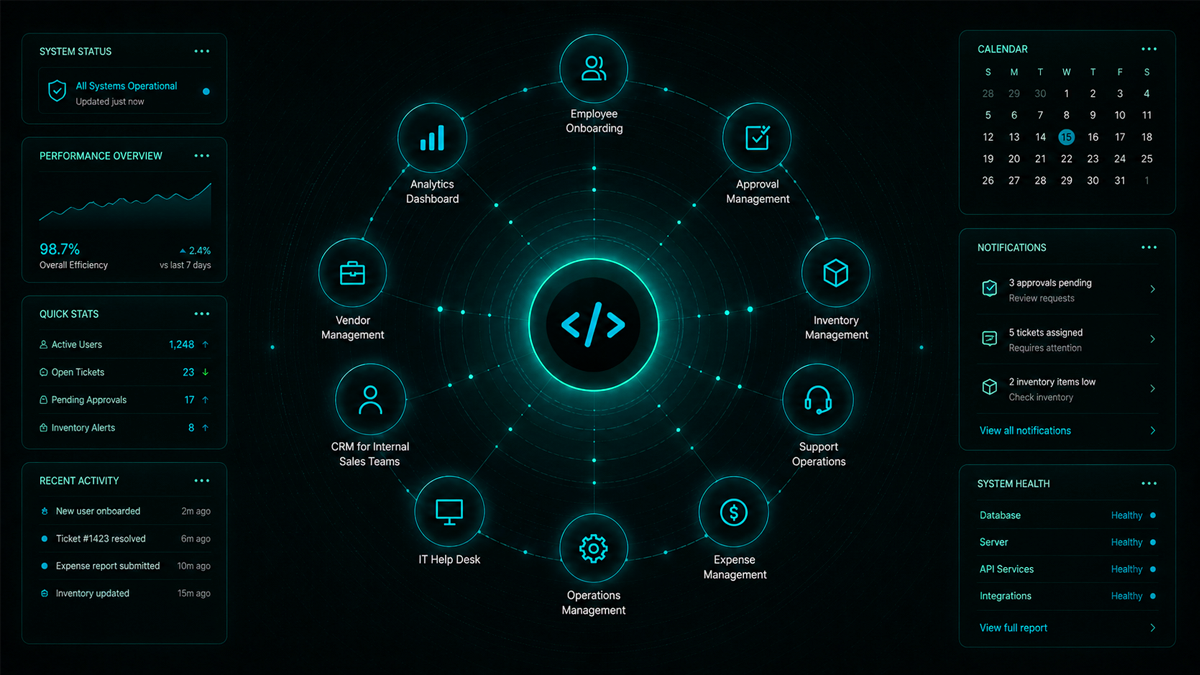
Modern businesses run on more than customer-facing software. Behind every efficient operation is a collection of internal tools that help teams manage workflows, automate repetitive tasks, track data, and improve decision-making.
As organizations grow, spreadsheets, email threads, and disconnected applications often become bottlenecks. This is why many companies invest in custom internal tools tailored to their operational processes.
If you're new to the concept, start by understanding what internal tools are and why organizations increasingly rely on them to streamline operations. From employee onboarding systems to inventory management platforms, internal tools have become essential for scaling efficiently.
In this guide, we'll explore 15 practical internal tools used by modern businesses and explain how each improves productivity.
What Are Internal Tools?
Internal tools are software applications built specifically for employees rather than customers. They help teams manage internal processes, organize data, automate workflows, and collaborate more effectively.
Unlike public-facing applications, internal tools focus on operational efficiency. Businesses use them to reduce manual work, improve visibility, and create standardized processes across departments.
Many organizations now use an internal tools builder to create custom solutions without investing months in traditional software development.
Why Businesses Build Internal Tools
Companies typically build internal tools when:
- Teams rely heavily on spreadsheets.
- Data exists across multiple systems.
- Manual approvals slow down operations.
- Reporting requires significant effort.
- Employees need a centralized workspace.
Well-designed internal tools help businesses save time, reduce errors, and improve operational transparency.
15 Internal Tool Examples Used by Modern Businesses
1. Employee Onboarding Portal
An onboarding portal helps HR teams manage new employee documentation, training schedules, equipment requests, and compliance requirements.
Instead of coordinating via email and spreadsheets, companies create structured workflows to ensure every onboarding task is completed on time.
Related use case: Employee and client onboarding software.
2. Project Management Dashboard
Project management tools allow teams to track tasks, deadlines, milestones, and resource allocation.
A centralized dashboard provides visibility into project status while helping managers identify risks before they become major issues.
Many businesses build custom versions of project management software to match their unique workflows.
3. Approval Management System
Approvals are a common source of delays in organizations.
Internal approval systems automate requests for:
- Budget approvals
- Purchase requests
- Leave applications
- Vendor onboarding
- Contract reviews
Automated routing significantly reduces processing time and improves accountability.
4. Inventory Management Tool
Retailers, manufacturers, and distributors often build inventory management systems to track stock levels in real time.
These tools help businesses:
- Prevent stock shortages
- Reduce excess inventory
- Track product movement
- Generate inventory reports
A custom internal inventory platform provides greater flexibility than generic solutions.
5. CRM for Internal Sales Teams
Many companies build lightweight CRM systems tailored to their sales processes.
These internal tools centralize:
- Lead information
- Customer interactions
- Follow-up activities
- Sales pipeline tracking
Unlike large enterprise CRM platforms, custom solutions focus only on the features teams actually need.
6. Customer Support Operations Dashboard
Support teams use internal dashboards to monitor tickets, response times, escalations, and customer satisfaction metrics.
Having operational data in one location enables managers to improve service quality and resource planning.
7. Expense Management Platform
Expense tracking remains a challenge for many growing businesses.
An internal expense management system allows employees to:
- Submit reimbursements
- Upload receipts
- Track approval status
- Generate expense reports
Automation reduces the finance team's workload while improving compliance.
8. Vendor Management Portal
Organizations working with multiple suppliers often require a centralized vendor management tool.
These systems help track:
- Vendor contracts
- Compliance documents
- Performance metrics
- Payment status
A dedicated client and vendor portal improves collaboration and visibility across supplier relationships.
9. Real-Time Business Dashboard
Leadership teams need immediate access to business performance data.
A custom real-time dashboard can combine information from multiple systems and display key metrics such as:
- Revenue
- Customer growth
- Operational KPIs
- Team productivity
- Service performance
Real-time visibility supports faster decision-making.
10. Knowledge Base and Documentation Hub
Internal documentation platforms help teams store and organize company knowledge.
Examples include:
- Standard operating procedures (SOPs)
- Training materials
- Technical documentation
- Policy manuals
A centralized knowledge hub reduces dependency on individual employees and improves organizational consistency.
11. Employee Performance Tracking System
HR and management teams often build internal performance management tools to track goals, reviews, and development plans.
These systems create transparency around:
- Objectives
- Performance reviews
- Feedback cycles
- Career progression
They also simplify reporting and workforce planning.
12. IT Help Desk Portal
IT departments frequently use internal ticketing systems to manage support requests.
Employees can submit issues, while IT teams can prioritize, assign, and track resolutions from a single interface.
This improves response times and reduces operational disruptions.
13. Loan Processing Workflow Tool
Financial organizations often create specialized internal systems for managing applications, approvals, and compliance reviews.
Examples include:
- Loan applications
- Credit assessments
- Underwriting workflows
- Approval management
A custom loan origination software solution enables lenders to automate complex workflows while maintaining regulatory compliance.
14. Internal Reporting and Analytics Platform
Business leaders rely on reporting tools to monitor performance and identify trends.
Custom reporting systems provide:
- Automated reports
- KPI tracking
- Departmental analytics
- Executive summaries
By centralizing operational data, businesses eliminate manual reporting efforts.
15. Operations Management Platform
Operations teams often require a single system that combines workflows, approvals, records, reporting, and automation.
These comprehensive tools become the operational backbone of an organization.
Many companies replace dozens of spreadsheets and disconnected applications with one centralized internal operations platform.
Common Features Found in Successful Internal Tools
Regardless of use case, effective internal tools typically include:
- Role-based access controls
- Workflow automation
- Custom dashboards
- Data management capabilities
- Reporting and analytics
- API integrations
- Activity tracking
- Mobile responsiveness
The best solutions are designed around actual business processes rather than forcing teams to adapt to generic software.
Build Internal Tools Faster With DrapCode
As operational complexity increases, businesses need flexible systems that can evolve alongside their processes.
DrapCode helps organizations build custom internal applications without traditional development overhead. Using a visual development environment, teams can create workflow automation systems, approval platforms, reporting dashboards, vendor portals, onboarding solutions, and other operational tools from a single platform.
Whether you're replacing spreadsheets or building a company-wide operations system, DrapCode's internal tools builder provides the flexibility needed to create secure, scalable, and production-ready business applications.
Final Thoughts
Internal tools are no longer reserved for large enterprises with dedicated engineering teams. Modern businesses of all sizes are building custom operational software to improve efficiency, automate workflows, and centralize data.
From onboarding portals and approval systems to reporting dashboards and vendor management platforms, the right internal tools can transform how teams work.
The key is to identify repetitive processes, understand operational bottlenecks, and build solutions that support long-term business growth.
Frequently Asked Questions
Q1. What are internal tools in business?
Internal tools are software applications built specifically for employees to manage workflows, automate processes, track data, and improve operational efficiency within an organization.
Q2. Why do companies build custom internal tools?
Companies build custom internal tools to eliminate repetitive manual tasks, centralize data, automate workflows, and create solutions tailored to their unique business processes.
Q3. What are some examples of internal tools?
Examples include employee onboarding portals, approval management systems, inventory tracking software, vendor portals, reporting dashboards, CRM systems, and IT help desk platforms.
Q4. Can internal tools be built without coding?
Yes. Modern no-code platforms like DrapCode allow businesses to build internal tools using visual development interfaces without requiring traditional software development expertise.
Q5. What features should an internal tool include?
Most successful internal tools include workflow automation, dashboards, reporting, role-based permissions, integrations, data management capabilities, and mobile responsiveness.